
Blog from M's system
About Volume Settings When Using Players (Audio Source Equipment) with Adjustable Volume, Such as Smartphones

This guidance covers how to set volume levels when using players (audio source equipment) with adjustable volume, such as smartphones.
When using players with adjustable volume, setting appropriate volume levels on both the player side and the connected amplifier (amplifier-equipped speaker) side will ensure more comfortable and safe enjoyment.
Particularly with players like smartphones that are typically used with earphones or headphones, there are cases where the smartphone volume is left unchanged when connecting to speakers. In such cases, since the audio signal from the player side is weak, users tend to turn up the volume on the connected amplifier side.
Setting the amplifier volume too high increases the burden on the amplifier and the load on the speakers, which can cause audio distortion and potentially lead to equipment failure. Please set the volume according to the following procedure:
① Set both the player and amplifier volumes to minimum (zero).
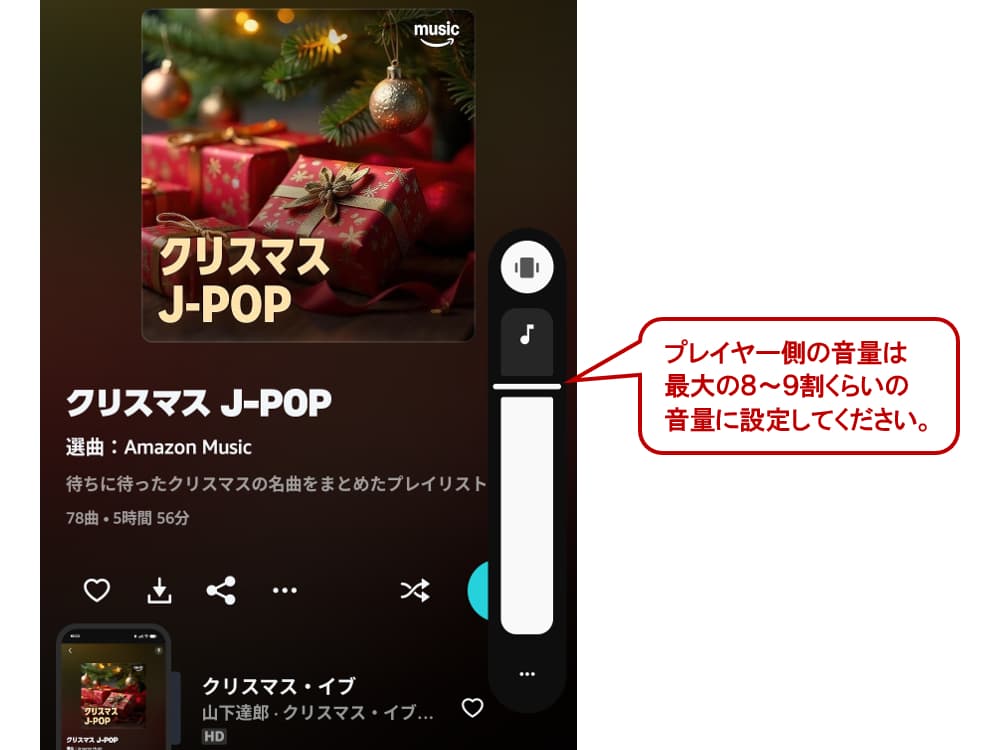
② Set the player volume to approximately 80-90% of maximum
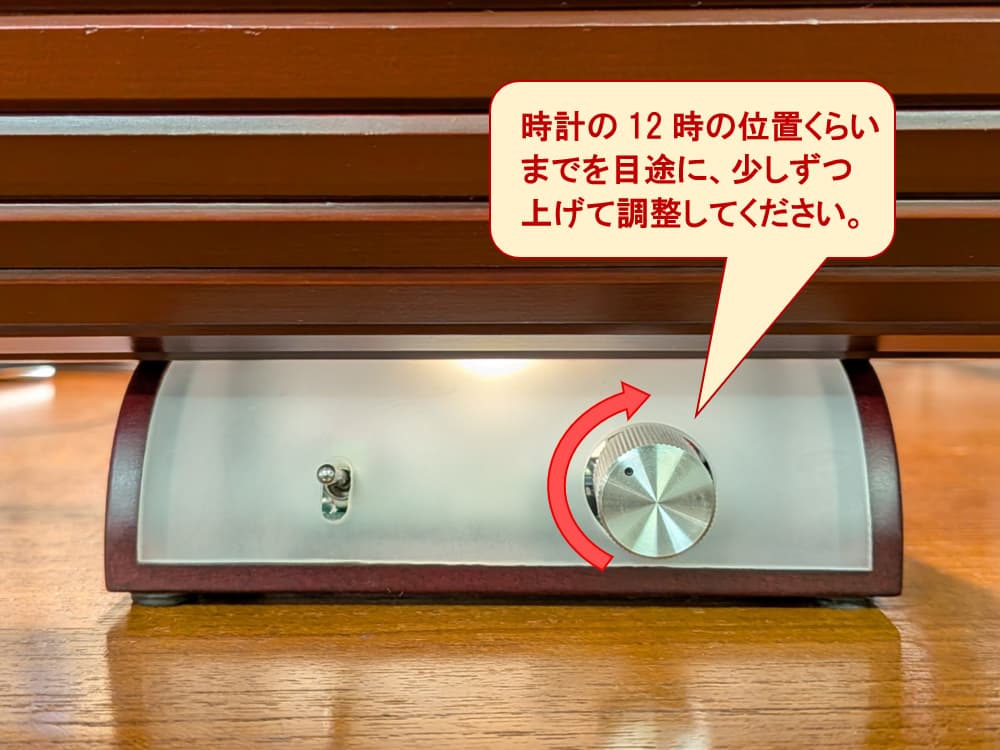
③ From the minimum "zero" position on the amplifier (amplifier-equipped speaker) side,
gradually increase the volume up to around the 12 o'clock position (as if on a clock face) until you reach a comfortable listening level.
This setting method reduces the burden on the amplifier (amplifier-equipped speaker), makes audio distortion less likely to occur, and allows for more comfortable and safe use. Please give this method a try.
Please also refer to the following related articles:
・How to Connect M's system Speakers via Bluetooth (Chocolat and Vanilla Edition)
・Sound Quality Improvement Tips When Enjoying Audio from Smartphones: "Key Settings in the Amazon Music App"
・Sound Quality Improvement Tips When Enjoying Audio from Smartphones: "Key Settings for Apple Music (iPhone)"
・Sound Quality Improvement Tips When Enjoying Audio from Smartphones: "What Are the Key Points in Cable Selection?"
Frequently Asked Questions
How should I set the volume when connecting a smartphone to an amplifier?+
What problems can occur if I turn up the amplifier volume too high?+
Why do I need to raise the volume on the player side?+
What are the benefits of setting the volume this way?+


More from our Blog
You may also be interested in
Latest in "News"

テレビ朝日
このたび、テレビ朝日「じゅん散歩」の新富町散策の中で、エムズシステムにお立ち寄りいただきました。 放送予定は、2026年10月1日(木)10:10〜10:40で…

テレビの
テレビの声が聞き取りにくいのは、テレビのスピーカーの音は一方向へ進むため、聞く場所が正面から少し外れるだけで届きにくくなってしまうからです。エムズシステムがご提…

部屋の
部屋の音環境を整える最初の一歩は、音を足すことでも、消すことでもありません。いま部屋にある音が「どこから、どんなふうに」届いているかを知ることです。私たちが考え…
Latest Articles
テレビ朝日
このたび、テレビ朝日「じゅん散歩」の新富町散策の中で、エムズシステムにお立ち寄りいただきました。 放送予定は、2026年10月1日(木)10:10〜10:40で…
テレビの
テレビの声が聞き取りにくいのは、テレビのスピーカーの音は一方向へ進むため、聞く場所が正面から少し外れるだけで届きにくくなってしまうからです。エムズシステムがご提…
部屋の
部屋の音環境を整える最初の一歩は、音を足すことでも、消すことでもありません。いま部屋にある音が「どこから、どんなふうに」届いているかを知ることです。私たちが考え…
Catalog Request
Product catalogs, customer voices, media features & more. Request materials here.
Newsletter
New products, events & more. Stay up to date with our latest news. Subscribe here.
Book a Session
Reserve your listening session.
Contact Us
Products, maintenance, events & more. Get in touch with us. We'd love to hear from you.